


Small step for you, giant step for your marketing
You’ve got patients to look after, staff to manage, phones ringing, and a million tiny decisions pulling at you. So let’s not pretend you’re going to “become a marketing person” in a weekend.
Google reviews are a major component of a Google Business Profile and Google Map Pack. They are also important for establishing trust with your target market. It is one of the easier-to-control aspects of your marketing, with good ROI.
Our Review Engine is a no nonsense approach to getting more and consistent reviews. You can install it in your practice in an afternoon. Then run a simple Review Engine weekly check-in that keeps reviews coming in without stress, beat your competition on Google Maps and convert local traffic into booked appointments.
There are a few rules to keep in mind, but the Review Engine is not complicated. It is one of the best ROI marketing activities you can implement in your business right away.
First, what even is “Google Map Pack”?
When people search location-based things like “physio near me” or “osteopath [suburb/town]”, Google presents them with what’s called the “Map Pack” because it is accompanied with a map. (AKA “Local Pack” or “3-Pack”). These usually appear above the standard search results when Google thinks the user has local intent.
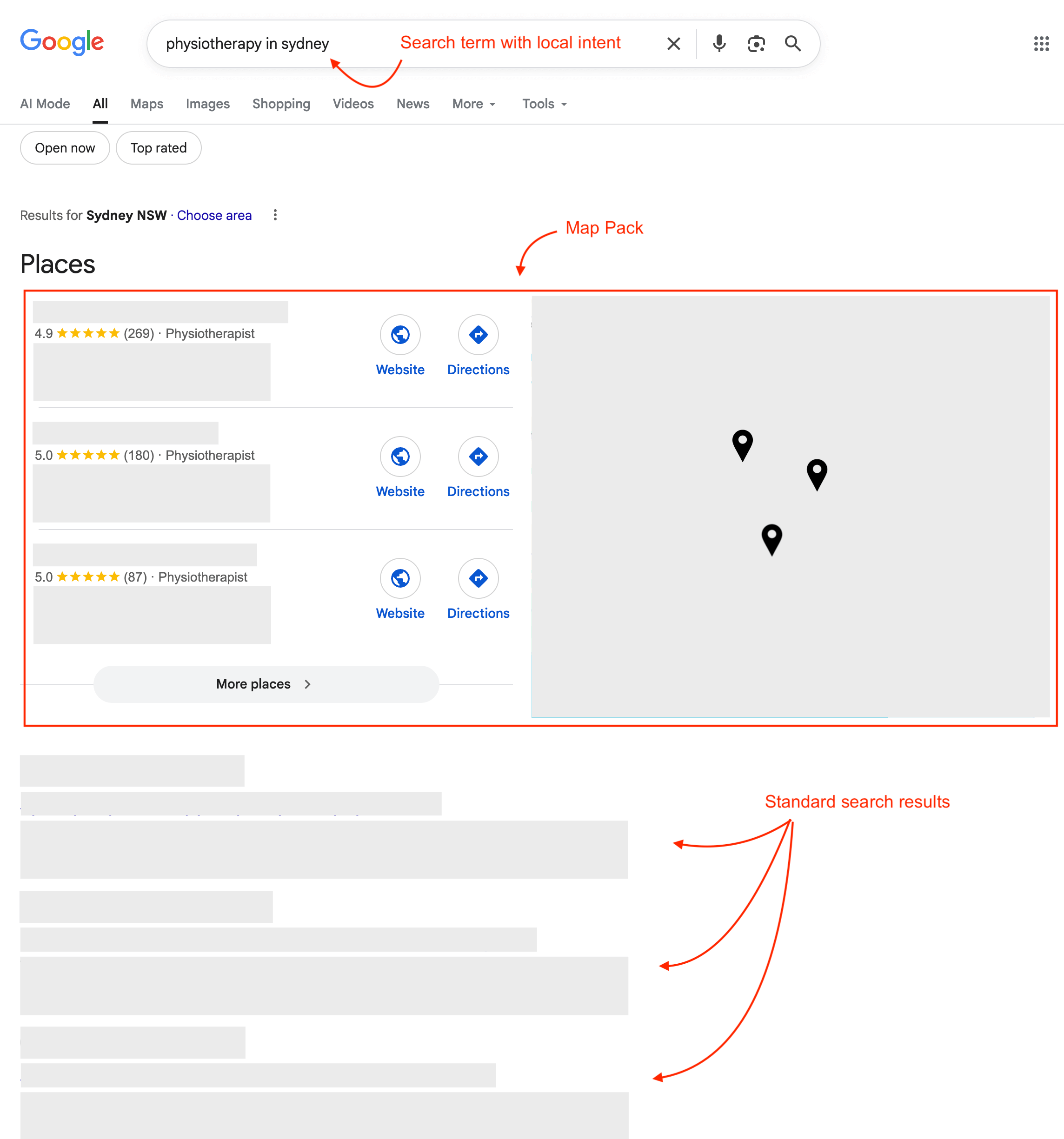
Many reports estimate that Map Pack listings get roughly half of clicks combined. That’s the difference between sound of a ringing phone and crickets.
For a local business, getting into the Map Pack is more valuable than your website ranking #1 organically, because 50% of people won’t scroll past the Map Pack.
What is a Google Business Profile?
A Google Business Profile (GBP) is what makes many things possible. Without a GBP, your business can not be listed in the Map Pack, or collect reviews. It essentially means Google is not aware of your business’ existence.
Most GBPs are created by the business owner or manager. Many GBPs are created automatically by Google, and need to be claimed by the business owner or manager. If you don’t have GBP at all, you will need to create one before you you do anything else.
Setting up your GBP is outside the scope of this guide. Get in touch with us if you need help.
How Google works
Google is popular because it gives useful search results. If users get what they want fast, they keep using Google and Google can keep selling ads.
For local business searches, Google’s results are largely based on relevance, distance, and prominence. So Google is quietly considering things like:
- Is your business actually the right match for what this user wants?
- Are you geographically close enough to be convenient?
- Do you look trusted and established?
That’s where reviews, photos, hours, and a well-filled Google Business Profile come in. They’re indicators that say, “Our business is real, we’re active, and people like coming here.”
Don’t know where to view all your reviews? See the Review Engine Toolkit at the end for instructions.
Local intent
Unlike searching Googling for a recipe, “local intent” includes specific keywords that put Google into a different search mode. Consider the following two scenarios:
“Osteopath near me”
This search term does not include a specific location. However web browsers (e.g. Chrome, Edge, Safari etc) have the technology to estimate the user’s physical location and convey this to Google along with the search term.
Google can then use this location information to return search results and include the Map Pack.
“Physiotherapist in [location]”
This search term includes a specific location. Google uses this to include the Map Pack. In this instance, the user’s physical location at the time of the search is ignored.
Why reviews turn into bookings
Firstly: More and regular positive reviews signals to Google that your business is well-trusted and established. It is a strong deciding factor whether you are included in the Map Pack for a given search.
Secondly: People don’t wake up excited to compare clinics. They want relief. They want certainty. They want to avoid choosing the wrong business. Reviews help with that. They’re social proof and reassurance. Your eyes are drawn to the little yellow stars.
Control what you can
When of comes to reviews, you are in control of a lot, actually.
1) Number of reviews
Simply ask for reviews, at the right time with the right words.
2) Consistency & recency
Seek new reviews systematically. Not in bursts, but consistently. Fresh reviews are the difference between “they used to be good” and “they’re still great”.
Consistency is also easier on your team. No big pushes. No awkward “we need reviews!” panic.
Recency is also what keeps you competitive in the Map Pack, because it’s a visible signal that your clinic is active and trusted right now, not just historically.
3) Average rating
You can’t technically request 5-star reviews. But you can build and run your business in a way that deserves 5 stars. Listen to the feedback if you are averaging under 4 stars.
Important rules
Fake and misleading reviews are frustrating. Both Google and various regulatory bodies have rules in place when it comes to reviews. Ignoring these can set you back months or worse.
This section is about keeping your Review Engine clean, compliant, and believable.
Rule #1: Real reviews
Google’s line is clear: Reviews should reflect genuine experience. That means you’re collecting reviews from people who’ve genuinely dealt with your business, not people doing you a favour (e.g. staff, family and friends).
The ACCC (Australia), the FTC (USA), the Competition Bureau (Canada) all have guidelines around collection and use of reviews, transparency and disclosure.
The policy is: Real reviews form real patients.
Rule #2: No incentives
Google treats incentives for reviews (including asking to change or remove a review) as fake engagement. Discounts, free goods, free services, gift cards… it’s all off limits.
The policy is: No incentives for reviews.
Rule #3: Heed your regulatory bodies
This is where allied health is a bit different from cafés and plumbers.
Under Australia’s National Law, for example, advertising a regulated health service can’t use testimonials in certain ways. AHPRA has specific rules.
If you’re not in Australia, keep the system — but check the rules in your patch.
- USA: HIPAA is the big one for privacy.
- Canada: Laws vary by province and sector.
Two practical takeaways for a clinic owner:
- Don’t copy/paste patient praise about clinical outcomes into your own marketing (website, ads, socials). What a patient says on Google may be fine; the risk increases when you reuse it as advertising you control.
- Not every comment is automatically a forbidden testimonial, but you don’t want your team guessing. If you’re unsure, keep your marketing focused on your approach, your services, your team, and the patient experience (booking, communication, clarity), rather than “this clinic fixed me” type claims.
Q) Can patients leave Google reviews?
A) Yes.
Q) Can we copy Google reviews onto our website?
A) Generally no (unless you’re 100% sure they contain no clinical aspects, and you publish them unedited).
Q) Are we responsible for removing Google reviews?
A) No, not if you don’t control the platform — but don’t engage in ways that look like re-using them as marketing
Rule #4: Privacy matters
Responding to reviews is good for trust. But healthcare replies have a trap: You can accidentally reveal personal info or confirm someone is a patient.
In Australia, the OAIC has explicitly warned businesses to be careful when responding publicly to negative reviews, because personal information can be mishandled quickly in the heat of the moment.
Watch out for these:
- Never confirm they’re a patient.
- Never mention appointment dates, conditions, treatments, or outcomes.
- Don’t “tell your side” with details.
Instead, reply like a calm professional business: Thank them, keep it general, and invite them to contact the clinic privately if required.
Get your team behind you
If it falls over, it usually falls over here. Not because your team doesn’t care. It’s because asking them to ask for reviews can feel a bit… salesy. We need to make it simple, patient-first, and safe.
Who’s responsible for what?
A system without ownership is a wish. Here’s a simple way to run it in a small-to-medium clinic:
- Owner / director: Sets the expectation and keeps the tone right.
- Review Captain: Responsible for owning and running the Review Engine, and the weekly check-ins. Usually the practice manager, a switched-on admin lead, or the owner.
- Front desk: Nails the “easy link” part (QR, SMS prompts, emails, quick reminders etc.)
- Practitioners: Make the ask at the right moment (because they’re the ones building trust in the treatment room).
At this point, decide and communicate who your Review Captain will be.
Start with “why”
Don’t pitch it as marketing. Pitch it as “helping the next patient”. For example:
“Reviews aren’t for our ego. They help locals feel safe booking with us. If we don’t ask, most people simply don’t know or forget.”
That line does two things: it removes cringe, and it gives staff a reason they can stand behind.
Get everyone on the same page
Staff want to do the right thing, but they’re worried they’ll say the wrong thing. So make the rules simple:
“We want honest reviews, without incentives or telling anyone what to write. We encourage general comments. For privacy reasons we discourage anything related to personal details and treatment or outcomes.”
See the Review Engine Toolkit at the end for a printable version of the Review Engine Policy.
Make “no” feel normal
A big reason staff avoid asking is fear of rejection. So give them permission:
- If someone says no, we accept, smile and move on.
- No awkwardness. No follow-up in person.
- The system works because we ask consistently over time, not because we persuade every patient.
Stick to the script
You can find simple and effective ways to ask for a review in the Review Engine Toolkit at the end.
Staff incentives can work
It’s fine to motivate staff: But reward the process, not the outcome.
- Team reward for hitting a weekly “asks sent” target.
- Recognition for consistency (“nice work keeping it going”).
- Small monthly treat if the routine ran every week.
The Review Engine
Let’s get onto the fun part: The system that makes reviews happen reliably, without awkwardness and without nagging your team.
Most clinics don’t have a “review problem”. They have a consistency problem.
They ask for reviews for a week or two (usually after someone mentions it at a meeting). Then life gets busy. Patients keep coming, staff keep juggling, and the review habit slips.
You need an engine
An engine doesn’t rely on enthusiasm. It relies on a simple routine that keeps running even when the clinic is flat out.
The Review Engine in one line:
Ask → Make it easy → Follow-up ask → Respond → Repeat
Five repeatable and scripted steps to make your Google profile look like a clinic that’s active, trusted, and cared for. Which is exactly what patients want to see… and what Google tends to reward.
Let’s explore each step in a real clinic (not a marketing fantasy).
Step 1: Ask
Let’s be honest: Most people don’t hate leaving reviews — they hate the hassle. Your staff don’t hate asking — they hate feeling like they’re asking for a favour.
So listen out for prompts from the patient like:
- “That made sense.”
- “I feel better.”
- “I’m glad I came.”
- “They actually listened.”
That’s the moment to ask. Not when they’re rushing out the door with keys in their mouth and a kid melting down in reception.
The ask should feel like a natural extension of good service, a part of patient care. You’re not begging. If it feels awkward, either your timing is off or you forgot the script.
You can find some great examples in the Review Engine Toolkit at the end.
Step 2: Make it easy
Here’s the blunt truth: if leaving a review takes more than a minute, most people won’t do it. It’s just too hard.
Use a poster with a QR code to help them get to your Google review form easily on their phone. Remember that it may be their first time posting any review. They may need to login to their Google Account to proceed. Some people may need technical assistance just to be able to leave a review.
Guide them, and then back off. Nobody wants an audience while they type. A simple, relaxed handoff works:
“No rush — feel free to take a seat at our reception to finish off.”
Step 3: Follow-up ask
This is where clinics either completely avoid… or go full robot and annoy everyone.
The sweet spot is one friendly follow-up ask, the next day.
They didn’t just decide “no”; chances are they simply forgot. A follow-up is basically a gentle nudge that says: “Hey, if you meant it, here’s the link again.”
No guilt. No pressure. No further follow-ups after that.
Step 4: Respond
Responding to reviews signals you’re paying attention. You don’t need to write an essay. A line or two is enough. Thank them, keep it general, and avoid anything that confirms personal details.
Replies to positive reviews:
- Reinforce trust for the next person reading,
- Nudge more people to leave reviews (because it looks like you actually care),
- Make your profile feel “alive”, not abandoned.
Replies to negative reviews get handled differently (we’ll cover that later), but the principle is the same: calm, brief, professional, and take it offline.
Step 5: Repeat
What makes an engine an engine, is rhythm.
Think of it like cleaning the clinic. You don’t do a deep clean once and call it done forever. You do a quick daily tidy, and a weekly reset. Reviews work the same way.
The Review Engine weekly check-in
Pick a day. Pick a time. Schedule it.
Review Captain is the person who owns the Review Engine and keeps it running weekly. Once a week, the Review Captain checks:
- How many asks were made (did all staff members ask every patient?)
- How many new reviews came in for the preceding week
- Any reviews needing replies
- Any obvious issues (e.g., “We forgot to ask 30% of the time last week”, “QR code fell down again”, “team felt awkward asking”)
Review Captain then decides on one small adjustment.
See the Review Engine Toolkit for a printable checklist.
… And that’s the Review Engine. Not perfect. Not fancy. Just consistent.
Once you’ve got the Review Engine running, you’re no longer “trying to get reviews”. You’re simply operating a clinic that collects them naturally, week after week.
Set it up once
This bit can be done in a single afternoon, together with your Review Captain.
Step 1: Get your Google direct review link
Every business with a Google Business Profile has unique Google URL (link) that when clicked, takes someone straight to the “Leave a review” form. See the Review Engine Toolkit if you need instructions.
If you need help with this step, reach out to us.
Step 2: Make a QR code-poster
You’ve seen those black and white blocky codes — they are simply links that are in picture form. They are easier to scan with a phone camera, than typing out confusing links.
To make your QR code-poster, you need to:
- Generate your QR code for your Google direct review link.
- See the Review Engine Toolkit if you need instructions for generating your QR code.
- Use a free tool like Canva to design a nice poster featuring this QR code image.
- Find a basic poster design and add your QR code and logo.
- Keep your message simple, like: “A quick Google review really helps us.”
If you need help with this step, reach out to us.
Step 3: Print and hang your posters
Print your posters in colour, A4 size. Then think: “Where is someone standing still for 10 seconds?”
Good spots:
- Reception counter, face height
- Near the EFTPOS terminal
- Waiting rooms
- Treatment rooms
- Toilets (make sure they’re clean!)
Bad spots:
- Behind reception (patients can’t get near it)
- In a busy doorway (no one stops)
- Tiny QR codes that need a microscope
Step 4: Set up your message templates
Decide on your message scripts:
- Same-day message (requested by practitioners and reception at front desk, after the appointment). Ensure staff practice asking.
- Next-day follow-up (sent by reception at front desk via email or SMS, one time). These can simply be copy/pasted.
See the Review Engine Toolkit for examples.
Step 5: Implement a simple tracker
Don’t overthink this. You just need visibility to see whether everyone did what they should. Ideas:
- A tick box in your practice software notes
- A simple weekly tally sheet in treatment rooms and at reception
- A shared Google Sheet with two columns: Asks sent / Reviews received
The tracker isn’t about policing staff. It’s about keeping the Review Engine alive.
How many reviews are enough?
This is the question every clinic owner asks… usually right after they see a competitor with 600 reviews and feel their stomach drop.
Here’s the good news: you don’t need “many hundreds” to win. You need enough to look trustworthy, and enough to look active, compared to the clinics around you.
A popular formula
Pick one core search term your patients actually use (e.g., “physiotherapy in [suburb]”, “osteopath near me”). Then:
Step 1: Total review goal (the “catch-up” number):
- Look at the top 3 clinics showing up on Google Maps for that search.
- Note the review count for the clinic in #2 position.
- Aim for 10% more reviews.
Step 2: Monthly pace goal (the “keep up” number):
- For those same top 3 clinics, count how many new reviews they’ve received in the last 90 days.
- Divide by 3 to get the average monthly pace.
- Aim for 20% more reviews per month.
This formula considers things like how crowded your area is, how far behind you are, consistency and recency. Once you’re clearly competitive, you can drop back to a maintenance pace and keep an eye on your competitor movements.
When new reviews slow down
If you have a quiet patch, don’t panic and “push harder”. Usually one of these is happening:
- Staff not asking / assume someone else is doing it
- The follow-ups are not being sent correctly or consistently
- The team is asking at awkward moments
- Reception is too busy to keep up
Fix it by tightening the system, not by applying guilt. Two quick fixes that work:
- Re-run the 10-minute huddle and practise the ask once.
- Automate the link sending.
Quick start
If you’ve never actively sought reviews in the past, you can get a quick start by sending out a well crafted, one-shot mass email to patients who visited in the last 3 months.
Most front-desk PMS software will facilitate this; or at least give you an export of contact email addresses for such a query.
Be careful if you will send emails manually yourself. There are spam laws and technical limits to consider.
Reach out to us, if you need guidance with this.
Responding to reviews
You should regularly respond to all reviews: Negative or positive, within 2-3 days. When you respond to reviews, you’re not writing to the reviewer: You’re replying to all the people in the future who are thinking:
“If something goes wrong, will this clinic handle it like adults?”
Reply to positive reviews
A short reply to a good review does three useful things:
- It makes your clinic feel present (not abandoned).
- It encourages more reviews because people see you actually read them.
- It quietly sells your clinic to the next person reading, without you “selling”.
Keep it brief.
Negative reviews: Possible opportunity
Your reply should sound calm, professional, brief. You’re signalling maturity, not winning a debate. One response only. Negative reviews are exhausting and they sting. So use a simple triage system.
1) Fair criticism
These are the most valuable, even though they’re annoying.
- Acknowledge the experience.
- Apologise for the frustration (without admitting specific facts you can’t verify publicly).
- Invite them to contact the clinic so you can resolve it.
2) Misunderstanding or “missing context”
This is common with fees, cancellations, waiting times.
- Don’t correct them point-by-point.
- Don’t explain your side with details.
- Keep it general: “We take feedback seriously” + “Please contact us so we can look into it.”.
3) Spam, wrong business, or nonsense
If it’s clearly fake or meant for someone else, don’t get dragged into a fight.
- Flag/report it in Google.
- If you reply at all, keep it minimal and neutral.
- Don’t post private details trying to “prove” they weren’t a patient.
Sometimes Google removes these, sometimes it doesn’t. Either way, your calm response is what future patients see.
See the Review Engine Toolkit for review reply examples.
Put the Review Engine into practice this week
You don’t need a perfect rollout. You need a clean start, a short routine, and a way to keep it alive when the clinic gets busy.
- Set it up once
- Get your team behind you
- Start the Engine
- Maintain the Review Engine weekly check-in
See the Review Engine Toolkit below for a checklist.
Review Engine Toolkit
This section is designed to be used, not admired. Copy/Paste/Print as required.
Viewing and responding to your reviews
Search for your business by name in Google. If you are logged into your Google Account you will see something like this:
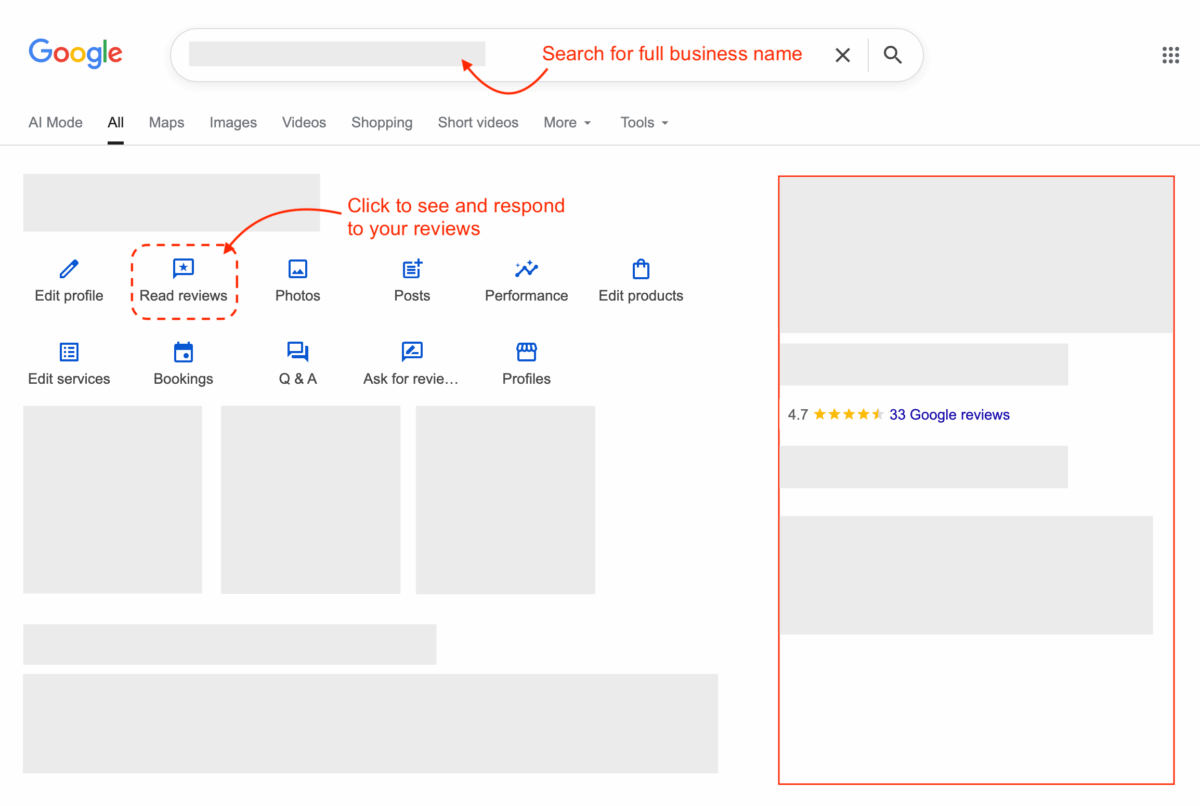
You can see your reviews, sort by recency and respond to them from here.
How to get your Google direct review link
Your direct review link is a special URL that can take someone straight to your Google review form, without typing or searching for anything.
If you manage your Google Business Profile
- Ensure you are logged into a Google Account that can manage your Google Business Profile
- Open your clinic’s Google Business Profile (the place you manage hours/photos/posts).
- Find the option that says “Ask for reviews” or “Get more reviews”.
- Copy the link.
- Save it somewhere obvious (notes app, a Google Doc called “Review Link”, whatever you’ll actually use).
If you don’t manage your Google Business Profile
- Use this tool to search for your business, by name.
- Select your business from search results.
- Click “Fetch links and IDs”
- Copy the link under “Get more reviews”
- Save it somewhere obvious (notes app, a Google Doc called “Review Link”, whatever you’ll actually use).
Quick check: Once you have your link, paste it into a fresh browser tab. It should open the review box straight away. If not, the link is not correct (probably missed something).
How to generate your Google direct review link QR code
A QR code is simply some information that is represented as a blocky graphic instead of text. It is easy for computers and smartphones to read from a distance.
- Visit QR Code Monkey
- Ensure URL is selected at the top (this is the default)
- Paste your direct review link (you obtained earlier) into the URL field
- Click “Generate QR code”
- Click “Download PNG”
Once you have downloaded the QR code graphic as a file on your computer, open it up and scan the QR code with your mobile phone, to test that it works and takes you straight to the “Leave a review” form.
it’s a good idea to rename the file something like “QR code for getting reviews.png” — you will use this graphic on posters, business cards and more.
The Review Engine Policy
Print and hang this in your staff room / kitchen
- We ask real patients for honest Google reviews.
- We ask consistently, at the right moments.
- We make it easy: Helping them scan the QR codes and find the review forms is fine.
- We give privacy respect and personal space to leave a review.
- We discourage including personal health info, treatment or outcome details for patient privacy reasons.
- When replying to reviews, we keep it general and never confirm someone is a patient.
How to ask for reviews on the day
Print and hang this in your staff room / kitchen
Pick one and stick to it. Familiar beats fancy.
Practitioner (treatment room):
“Would you mind leaving us a Google review while Janet at reception takes care of your account? You can scan this code with your phone to get started. General feedback about your experience helps other locals feel confident booking here.”
Receptionist (during checkout):
“Is everything all good today? A Google review from you will really help us — You can scan this code with your phone to get started while I wrap up your account.”
If help is requested:
Use this only if the patient asks what to write, or you want to gently guide them.
“It helps if you mention things like our facilities, booking process, whether you felt listened to, and how clearly things were explained. For your privacy, please don’t include any personal details, anything about your condition, treatment or outcomes”.
Common responses
If they’re rushed
“No worries — I’ll text it through for later.” Then send text or email.
If they say no
“All good — totally understand.”
They look unsure after saying yes
“All good — no pressure.”
They had a mixed experience
Work to address the issue instead.
Next-day follow-up
Subject options:
- Thanks for visiting [CLINIC NAME]
- Quick favour? (30 seconds)
- How did we do?
Email body:
Hi [FIRST NAME],
Thanks again for visiting [CLINIC NAME].
If you’ve got a minute, we’d really appreciate an honest Google review. It helps other locals feel confident choosing a clinic. For your privacy please keep it general; avoid personal or treatment details.
Here’s the link: [GOOGLE DIRECT REVIEW LINK]
Thanks
Quick check: Remember to send yourself a test — ensure that the link is working.
SMS text
Hi [FIRST NAME], thanks for coming in to [CLINIC NAME] today.
If you’ve got a minute, we’d really appreciate an honest Google review. It helps other locals feel confident choosing a clinic. For your privacy please keep it general; avoid personal or treatment details.
[GOOGLE DIRECT REVIEW LINK]
[CLINIC NAME]
Quick check: Remember to send yourself a test — ensure that the link is working.
Review reply templates
Reply rule: never confirm patient status, never mention conditions, treatment, dates, or outcomes.
For positive reviews
“Thanks for the lovely feedback, [NAME/there]. We really appreciate it. We’re glad you had a good experience with our team, and we look forward to seeing you again.”
“Thanks for taking the time to leave a review. We’re really glad you felt supported and well looked after. We appreciate your kind words.”
For negative review reply
“Thanks for your feedback. We’re sorry to hear you had a frustrating experience. For privacy reasons we can’t discuss details here, but we’d like to understand what happened and see if we can help. Please contact the clinic on [PHONE/EMAIL] and ask for [NAME/ROLE].”
Spam / wrong business reviews
“Thanks for the note. We don’t recognise this situation, but we’re happy to look into it. Please contact [CLINIC NAME] directly on [PHONE/EMAIL].”
The Review Engine weekly check-in
This is to be done same time each week, by the Review Captain
- Count/estimate asks sent
- Count new reviews
- Identify one friction point and fix it (e.g., “We forgot to ask 30% of the time last week”, “QR code fell down again”, “team felt awkward asking”)
- Reply to new reviews
If you track only one thing, track asks sent. Reviews follow.
Reviews are very important — but only a part of a greater Local SEO campaign. Need help? We can offer guidance, or run a Local SEO campaign for you.